Compare model-pair workload, share of total clashes and workflow progress across the report.
MetaBIMLab Product · Navisworks
Active development
ReportPilot
ReportPilot is a MetaBIMLab product under development for Navisworks-based BIM coordination, clash reporting, and collaborative report workflows.
Current development interface shown. Layout, sample data and product details may change before release.

Current development preview
ReportPilot interface views.
These screenshots are from the current ReportPilot development workflow. Public release details will be published separately when approved.


Feature walkthrough
See where each ReportPilot capability fits.
The current development build combines report generation, coordination review, analysis, discussion, meeting workflows and user-reviewed AI assistance.
01 · Coordination dashboard
Turn a large clash report into a coordination overview.
Instead of reading thousands of clashes row by row, the current dashboard brings key review signals into one place so the coordinator can see where attention is needed.
- Overall coordinationSee total clashes, resolved progress, remaining workload and report-level summary.
- Issue workflow progressTrack how issues move through the current review workflow.
- Priority & discipline progressSee where prioritization or responsibility assignment is still incomplete.
- Level & setting-out grid viewsLocate concentration areas using project location breakdowns.
02 · Advanced analysis
Move from clash totals to coordination patterns.
Pair analysis helps expose which model combinations and discipline combinations are carrying the largest coordination workload, so review effort can be focused where it matters most.
Map discipline-to-discipline conflict concentration and review the strongest coordination relationships.


03 · Clash coordination workspace
Keep the review decision connected to the clash.
The working report brings clash data, workflow state, responsibility, coordination records, evidence and discussion into the same review surface.


04 · Meeting mode
Review selected issues in a focused coordination session.
Meeting mode is designed around a selected issue queue, clash imagery, review status, responsibility information and the discussion/decision record so the meeting stays tied to the same coordination data used outside the meeting.
- Selected meeting queue
- Issue-by-issue review
- Meeting notes and outcomes
- Discussion and decision context


Inside Autodesk Navisworks
ReportPilot works directly from the coordination environment.
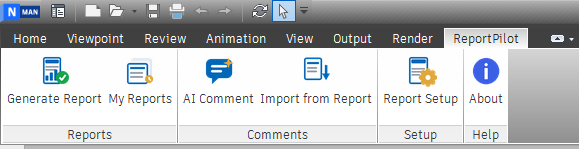
Generate reports, reopen previous reports, draft AI-assisted comments, import report information and manage report setup from the ReportPilot ribbon.
Generate Report
My Reports
AI Comment
Import from Report
Report Setup
Generate Report
Build clash and viewpoint reports from the live Navisworks model.
ReportPilot guides the user from report type, to clash-test selection, to snapshot appearance before generation.
01 Choose report

02 Select clash tests

03 Set snapshots

Repeat workflow
Designed for faster repeated coordination reporting.
In current development testing, repeated generation on an active project with more than 1,800 clashes has completed in under a minute after the initial export. Actual timing varies with model size, hardware, snapshots and report configuration.
My Reports
Return to working reports without rebuilding the workflow from scratch.
The current My Reports view keeps generated reports organized by model and provides direct actions to open, re-run, regenerate, locate or rename a report.

06 · AI-assisted coordination
Current development feature
Draft a clash comment with engineering context, then keep the user in control.
ReportPilot can prepare an AI-assisted coordination comment from the selected clash and user-supplied engineering context. The generated text remains reviewable and editable before the user explicitly writes it to Navisworks.
01
Select the clash
Confirm the correct clash and both elements before commenting.

02
Add engineering context
Describe movement constraints, preferred fix direction and coordination context.

03
Review before writing
Edit the generated draft and explicitly choose whether to write it to Navisworks.

Assistive, not autonomous.
The user reviews the draft and controls the final write-back to Navisworks.
Product direction
Current workflow first. Connected coordination grows in stages.
Public status labels separate what is being demonstrated now from later roadmap direction.
Navisworks reporting & AI-assisted comments
Report generation, report management, coordination workspace views and user-reviewed AI-assisted clash comment drafting.
Project collaboration
Project Connection and provider-neutral Team Sync remain part of the staged collaboration direction described by the website roadmap.
MetaBIMLab Cloud & advanced intelligence
Authoritative cloud collaboration and broader coordination intelligence remain future roadmap phases and are not presented as released features.
Public development stage
Active development.
No public release date is currently published. Pricing, licensing, compatibility details and cloud commitments will be published only after they are approved for public release.
Contact MetaBIMLab →ReportPilot